Physical Address
304 North Cardinal St.
Dorchester Center, MA 02124
Physical Address
304 North Cardinal St.
Dorchester Center, MA 02124


Discover how AEM Agents within the AI Assistant solve the content velocity gap by automating production, discovery, and governance directly in your AEM workflow.
I’ve been working with AEM for over a decade now. I’ve seen it evolve from CQ 5.x to AEM as a Cloud Service, and now we’re in the middle of another major shift with Edge Delivery Services and Universal Editor.
Throughout this journey, we’ve always had two parallel challenges: the technical side (architecture, performance, delivery) and the content side (authoring, production, governance). We’ve made huge progress on the technical front—headless architectures, Core Components, Edge Delivery Services. But the content challenge has become sharper since LLMs arrived.
Today, businesses need to produce more content for more channels, in more variations, and with more personalization than ever. The infrastructure (like Edge Delivery Services) can handle the speed—but teams are still struggling to create and adapt the content itself fast enough to keep up.
So naturally, many of us started using AI assistants like ChatGPT or Claude to speed up writing. It helped, but the workflow remained fundamentally broken: you generate something in a separate tab, copy it into AEM, and then spend hours manually reworking it to match your components, content fragments, and brand rules.
Beyond just creation, updates and maintenance have always been the hidden tax on productivity. In the “old way,” if you had to modify a campaign or swap an asset across multiple pages, it was incredibly tedious. Finding the right content, validating it against brand guidelines, and checking dependencies often meant opening a dozen tabs or, worse, waiting for the IT team to provide the information because only they had the “insider” knowledge of the system.
This is where AEM Agents become relevant. It is a massive shift from Adobe because these are not just “another assistant” you chat with in a separate window. They are agentic capabilities built directly into the AEM AI Assistant. They are designed to operate within your actual AEM workflows—finding assets, producing variations, performing bulk updates, and supporting governance—so your team spends less time on handoffs and repetitive “information hunting”.
Let me break down what these AEM agents actually do and why they matter for both the business and the developers..
When I first heard ‘Agents in AEM’, I was skeptical—there’s been a lot of AI noise lately. But after seeing how they work inside AEM (not outside with copy/paste), the value became clear.
AEM Agents aren’t chatbots. They’ve specialized, autonomous capabilities that work inside your AEM environment to handle specific repetitive tasks. They understand your content structure, your governance rules, brand guidelines and your technical setup.
The key difference from generic AI tools is context. These agents know your AEM instance. Your content model. Your brand guidelines. Your workflow.
They work within your existing processes instead of requiring you to export data, use external tools, and manually import results back in. They operate inside AEM’s permissions model, so governance doesn’t break.
Currently, AEM offers five agents:
What makes this practical is you don’t need to manually pick which agent to use. You access them through the AI Assistant in AEM, and depending on what you ask, AEM automatically routes your request to the right agent behind the scenes. Just describe what you need in plain language, and the system figures out the rest.
Three things I’ve observed:
Important: these agents help your team work faster. They don’t replace human judgment. Content still needs human review to ensure it aligns with brand values and keep it personal so that it actually connects with your audience.
Now, let’s get practical. I want to break down exactly which bottlenecks these AEM agents solve and how you can apply them to your own AEM implementation for maximum benefit.
I’ve worked with AEM DAM that had millions of assets. Authors spent significant time searching for specific files and it gets worse with duplicate content. Even with proper metadata and tagging, people don’t remember exact tag values or folder structures from six months ago.
The Discovery Agent enables natural language search across Assets, Content Fragments, and Adaptive Forms. So you could try something like, “Find the product banner from the holiday email campaign”, “show me assets with people holding coffee mug” and that works, even if the asset isn’t tagged with those exact terms. It understands the content and relationships between content and context.
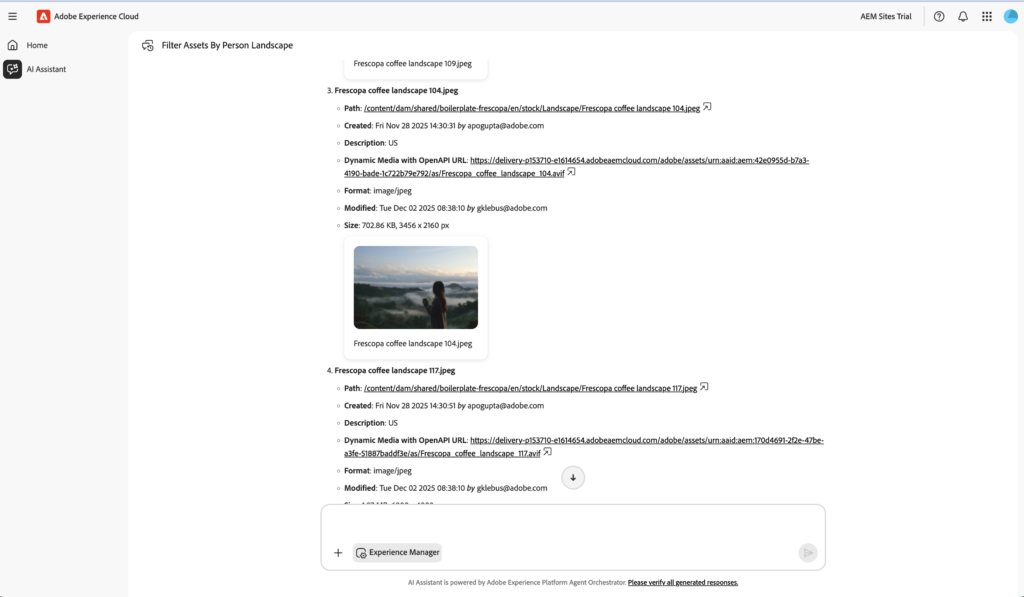
This solves a real problem that taxonomy or structure alone doesn’t fix. I am not saying they are irrelevant, you should still use tags and define structure but this saves you time on how you search them today.
Marketing teams need content creation at scale. Same campaign, but different headlines for different segments. Different messaging for different regions. Different visuals for A/B tests.
For example, You can modify the content of the page without even navigating within AEM. You just provide the live page url for which you want to change, supply what you want to change and Agent does the rest.

The Experience Production Agent automates these high-volume, high-effort tasks. It turns manual, weeks-long processes into fast, AI-assisted workflows. It can help you update content at scale, create forms or even migrate your existing websites.
Here’s where the Content Optimization Agent becomes valuable. It’s different from Dynamic Media, which handles technical renditions automatically.
The Content Optimization Agent transforms assets by applying natural language instructions to create channel-ready variations. It can generate new renditions at specific resolutions and quality levels, apply visual enhancements and create platform-specific renditions like Instagram Stories formats.
Sample use cases: “Create a 2000px rendition as JPEG with 80% quality” or “Create a rendition for an Instagram Story” or “Change background color of the PNG to #ff8932”.
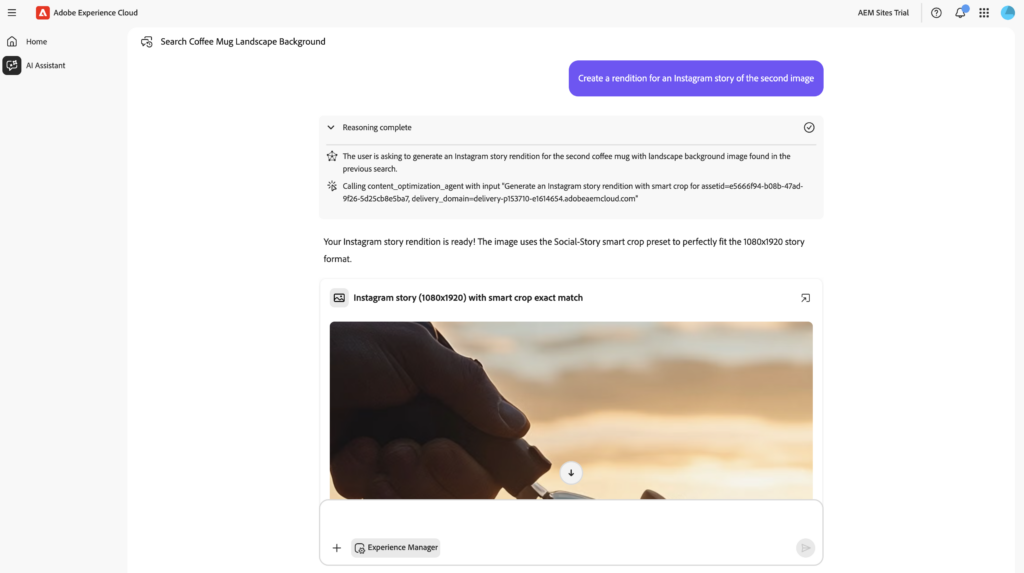
When I first started working with AEM Cloud, I remember spending hours debugging pipeline failures—scrolling through logs, trying to figure out which dependency or configuration was actually causing the build to break. It’s tedious work that drains time you’d rather spend on actual development.
The Development Agent addresses exactly this problem. When a build fails in development, stage, or production environments, it retrieves pipeline statuses, examines build logs, and suggests fixes based on the errors it finds. You still apply the fixes through pipeline to have full control, but the agent handles the diagnosis part—the time-consuming hunt through verbose log output.
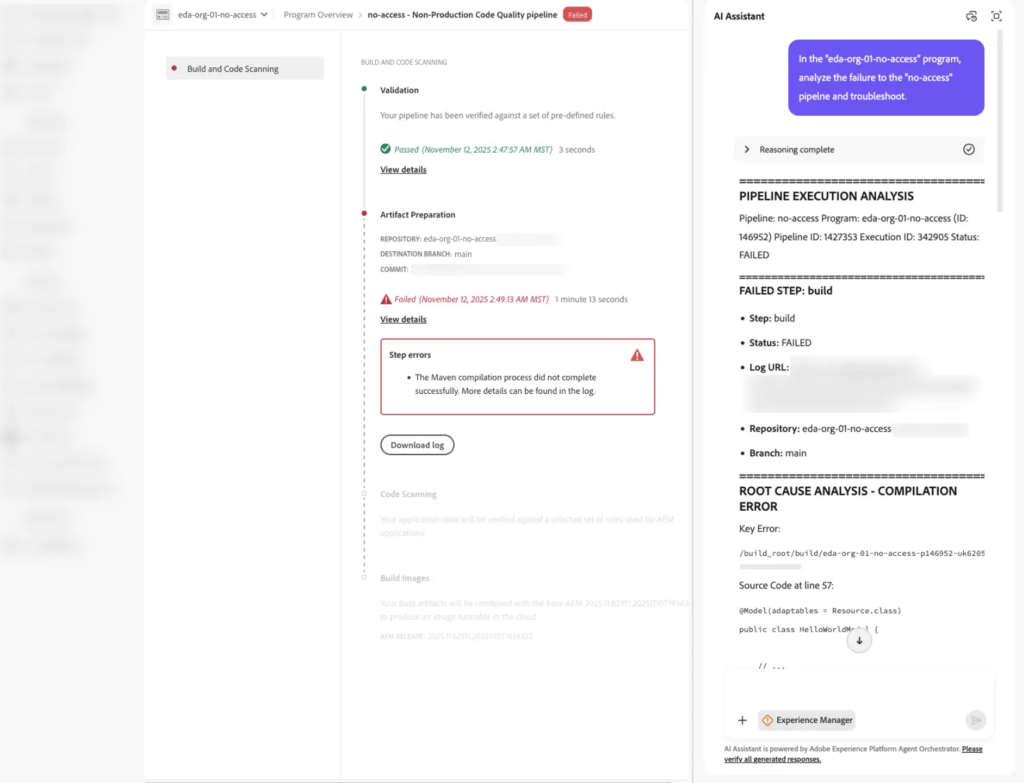
As Adobe expands agent capabilities, we’ll likely see more development workflow automation, but the current focus is on reducing the time developers spend stuck on deployment issues.
On enterprise implementations with strict brand guidelines, manual review creates bottlenecks. Content waits in approval queues.
The Governance Agent solves this by automating brand and policy guardrails. It performs the “first pass” on brand checks and DRM compliance, ensuring assets stay within guidelines without manual intervention.
Key capabilities include validating content against brand guidelines in real-time—checking tone, claims, assets expiration, permissions, etc. So you could check for instance “Show me expired assets”, “Check if X page if it follows brand guidelines” or even “Show me brand guidelines” in case you want to check them while creating content.

These are just some of the scenarios, but there are endless possibilities which can fit your use cases.
Let’s talk about the current limitations, These agents are currently only available for:
These agents are currently part of the Early Access Program but the good new is that Adobe provides a 30-day trial through AEM Playground at https://aem.now. It’s a sandbox environment where you can test agents without impacting production systems.
For a detailed walkthrough on setting this up, check out my article.
If you work with AEM, these agents address real operational problems. Not everything, not perfectly, but enough to be worth evaluating for your specific implementation needs.
Note: The views and opinions expressed in this post are personal and do not necessarily reflect Adobe or any affiliated organization.